DISCO
Designing Intelligent Spaces for Collaboration
UROP Prototype: Collaborative VR with Photon Networking
System Overview
This UROP prototype of DISCO demonstrates real-time, spatially-aware collaboration using virtual reality and generative AI. DISCO has many different prototypes, and this implementation focuses on the networking and collaborative whiteboard aspects of the broader DISCO research initiative led by Dr. Janet Johnson and Dr. Michael Nebeling.
Photon Fusion
Advanced multiplayer networking for real-time collaboration
Unity XR Toolkit
Immersive VR/MR experiences across multiple platforms
GPT Integration
Azure-backed AI for intelligent assistance and content generation
Role-based Access
Dynamic interfaces for Researchers and Participants
Smart Whiteboard
The UROP prototype of DISCO features an intelligent whiteboard system where users can draw and collaborate in 3D space. Backed by real-time RenderTexture technology, it creates a shared canvas for teams to visualize ideas together.

Interactive Features
3D Drawing & Annotation
Draw directly in 3D space with precision controls and multi-user synchronization
GPT-Generated Text
AI-powered text generation for notes, summaries, and creative content
Auto-Rendered Graphs
Instantly visualize data with AI-generated charts and graphs
Time Rewind
Navigate through session history with 5-minute snapshots
Whiteboard Technical Details
An in-depth look at how the whiteboard system works in the UROP prototype of DISCO and how Photon networking facilitates real-time collaboration.
Whiteboard Architecture
The whiteboard system in the UROP prototype of DISCO is built using Unity's texture manipulation capabilities. At its core, it consists of four main components:
Whiteboard Component
Creates and manages a Texture2D that serves as the drawing canvas, applied to a 3D object in the virtual environment.
Marker Component
Handles user input for drawing, using raycasting to detect when the marker touches the whiteboard and applying pixel changes to the texture.
History Manager
Periodically saves snapshots of the whiteboard state, allowing users to navigate through the history of changes.
Network Synchronization
Uses Photon networking to synchronize whiteboard changes across all connected clients in real-time.
This architecture creates a seamless collaborative experience where multiple users can draw on the same virtual whiteboard simultaneously, with changes visible to everyone in real-time.
Multiuser Architecture
This UROP prototype of DISCO leverages Photon Fusion to demonstrate multiplayer capabilities. The architecture implemented in this prototype enables researchers to create and manage rooms while participants can join and collaborate in real-time, supporting the research goals of Dr. Janet Johnson and Dr. Michael Nebeling.
Researcher Role
- Creates and configures rooms
- Access to admin controls
- Can modify environment
Participant Role
- Auto-joins based on room code
- Collaborative access
- Focused interface
AI Integration Note
While this UROP prototype focuses on the networking and collaborative whiteboard aspects, the broader DISCO project by Dr. Janet Johnson and Dr. Michael Nebeling includes advanced AI capabilities for intelligent assistance during collaborative sessions. These AI features were developed by the broader research team.
Project Gallery
Visual documentation of the UROP prototype of DISCO in action, showcasing the interface and collaborative features implemented in this specific version of the project.
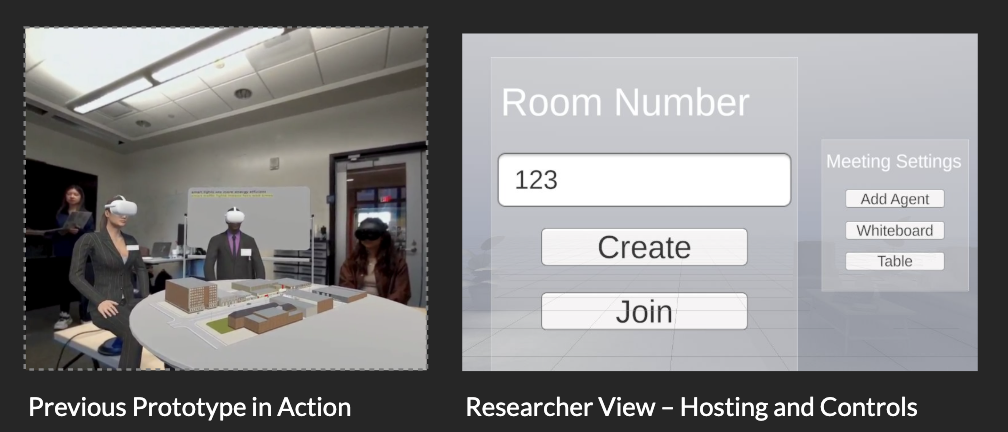
Previous Prototype in Action
Users testing the DISCO system with VR headsets in a collaborative environment.
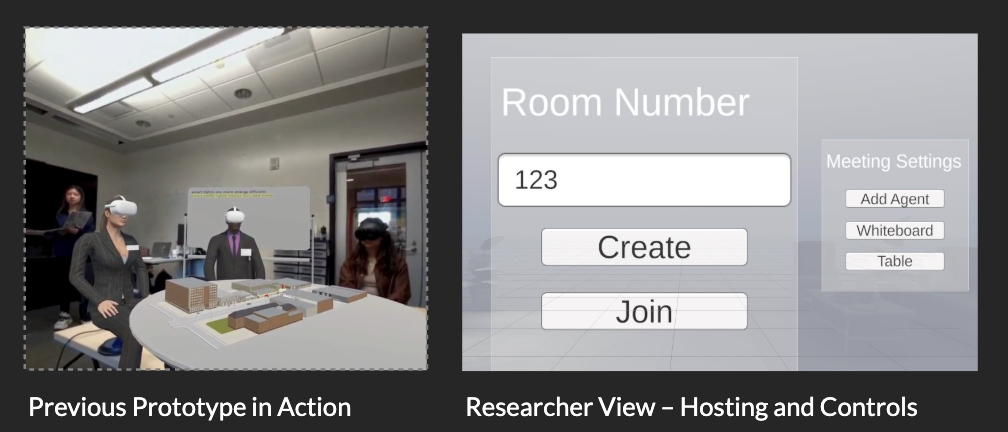
Researcher View – Hosting and Controls
Interface for researchers to create rooms, manage settings, and control the collaborative environment.
Research Poster
This research poster outlines the UROP prototype of DISCO presented at the University of Michigan, one of several prototypes developed under the broader DISCO research initiative.
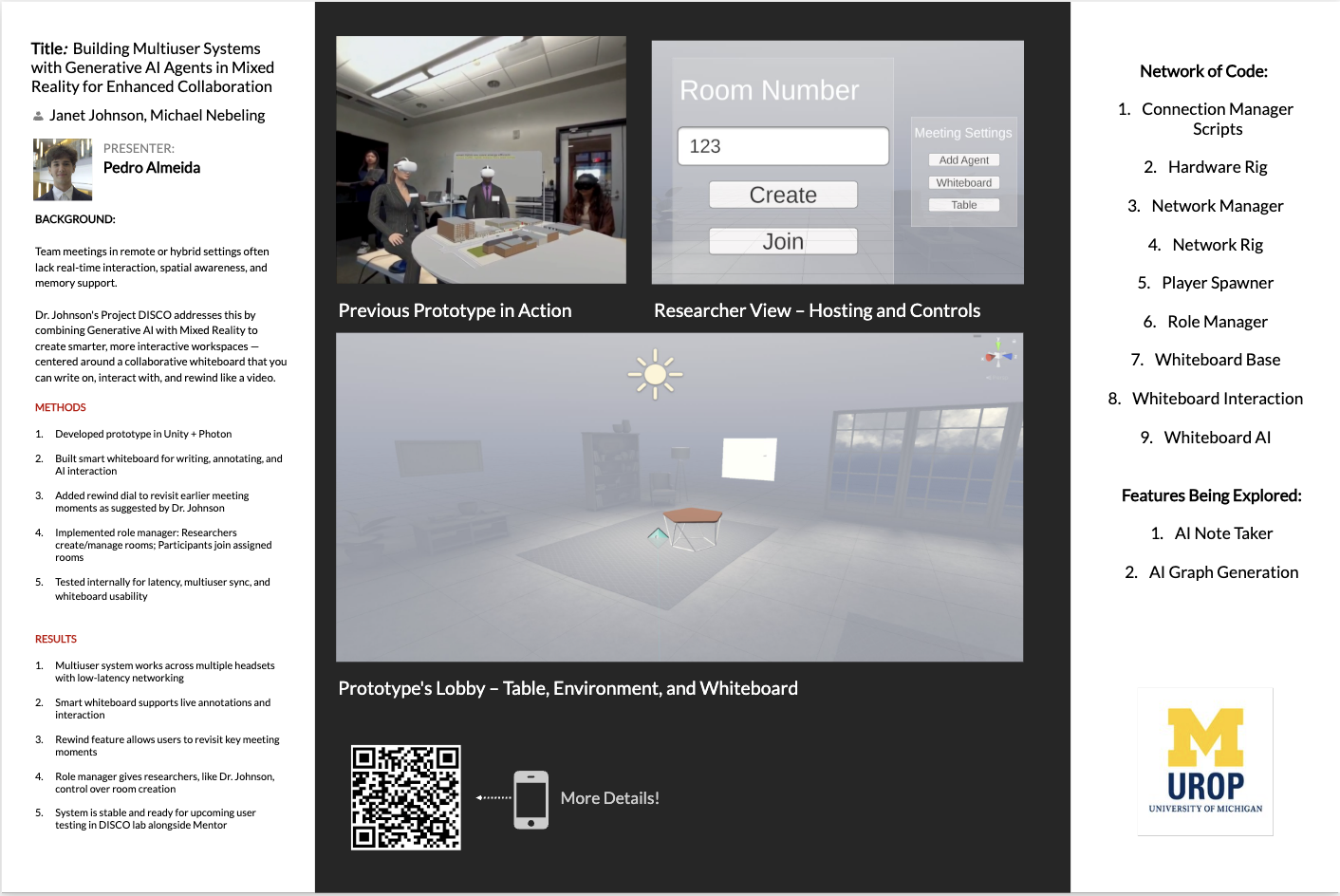
Click on the poster to view in full size
My Contributions
As the developer on this project, I specifically focused on implementing three core components:
Photon Integration
Implemented the multiplayer networking foundation using Photon Fusion, enabling real-time collaboration across multiple VR headsets with low-latency synchronization.
Whiteboard System
Developed the collaborative whiteboard with RenderTexture technology, supporting multi-user drawing, annotations, and the time-rewind feature that captures snapshots every 5 minutes.
Base Prototype
Created the foundational Unity XR environment, including the role manager system that differentiates between researcher and participant interfaces and permissions.
Project Context
This work was conducted as part of the research initiative led by Dr. Janet Johnson and Dr. Michael Nebeling, with the AI components and theoretical framework developed by the broader research team. My focus was on the technical implementation of the collaborative systems for this specific UROP prototype.
Technical Highlights
This UROP prototype of DISCO leverages several technologies and custom implementations to demonstrate collaborative VR capabilities. Here are some key technical components implemented in this specific prototype.
C# Scripting
Advanced C# scripting for RenderTextures and whiteboard drawing functionality
// Whiteboard drawing implementation
private void UpdateTexture(Vector2 uvCoord, Color color) {
  texture.SetPixel((int)(uvCoord.x * textureSize.x),
  (int)(uvCoord.y * textureSize.y), color);
  texture.Apply();
}
GPT-Flask Bridge
Custom API bridge between Unity and Azure OpenAI services
// Flask API endpoint for GPT integration
@app.route('/api/generate', methods=['POST'])
def generate_text():
  data = request.json
  response = openai.Completion.create(
    engine="text-davinci-003",
    prompt=data['prompt'],
    max_tokens=150
  )
  return jsonify({'text': response.choices[0].text})
Snapshot Manager
Time-based snapshot system for whiteboard history
// Snapshot creation and management
private void CreateSnapshot() {
  Texture2D snapshot = new Texture2D(
    whiteboard.texture.width,
    whiteboard.texture.height
  );
  snapshot.SetPixels(whiteboard.texture.GetPixels());
  snapshot.Apply();
  snapshots.Add(Time.time, snapshot);
}
Photon Callbacks
Network synchronization for multiplayer experiences
// Photon network callbacks
public override void OnPlayerEnteredRoom(Player newPlayer) {
  base.OnPlayerEnteredRoom(newPlayer);
  if (PhotonNetwork.IsMasterClient) {
    photonView.RPC("SyncWhiteboard", newPlayer,
      Convert.ToBase64String(whiteboard.EncodeToPNG()));
  }
}
Role Manager
Dynamic interface control based on user roles
// Role-based interface management
public void SetUserRole(UserRole role) {
  currentRole = role;
  switch (role) {
    case UserRole.Researcher:
      EnableResearcherControls();
      break;
    case UserRole.Participant:
      EnableParticipantControls();
      break;
  }
}